When you return gaming inventory to the distributor for a refund, you must create in CG Made Easy a return invoice – also known as a credit memo. Unlike purchased inventory, credit memo invoices are not able to be imported into CG Made Easy. They must be created through the method described here:
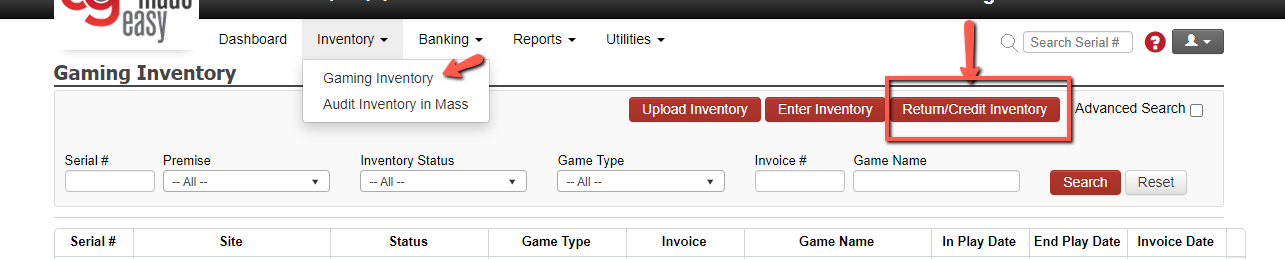
On the Gaming Inventory screen, please click the RETURN/CREDIT INVENTORY button.
On the pop-up screen, select the PREMISE from the credit memo inventory, as well as the DISTRIBUTOR. Then click SEARCH.
A list of all serial numbers with a status of IN INVENTORY will appear. Use the check boxes to select those serial numbers which are being returned via the credit memo.
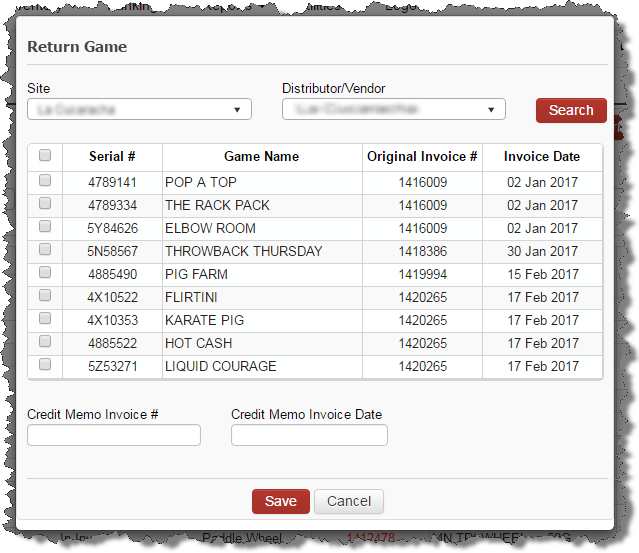
Complete the bottom by entering the CREDIT MEMO INVOICE # and the CREDIT MEMO INVOICE DATE. Then select APPLY.
The Invoice Details screen will display showing the details of the Credit Memo invoice with taxes, etc. If any adjustments are needed, simply update the details and SAVE.
Creating this Credit Memo invoice did the following two things:
The serial numbers are now updated on the perpetual inventory as having been returned.
The EXPENSES screen for GAMBLING PRODUCT will now include this credit memo invoice value as a negative number so it can be applied toward a future payment to the distributor.