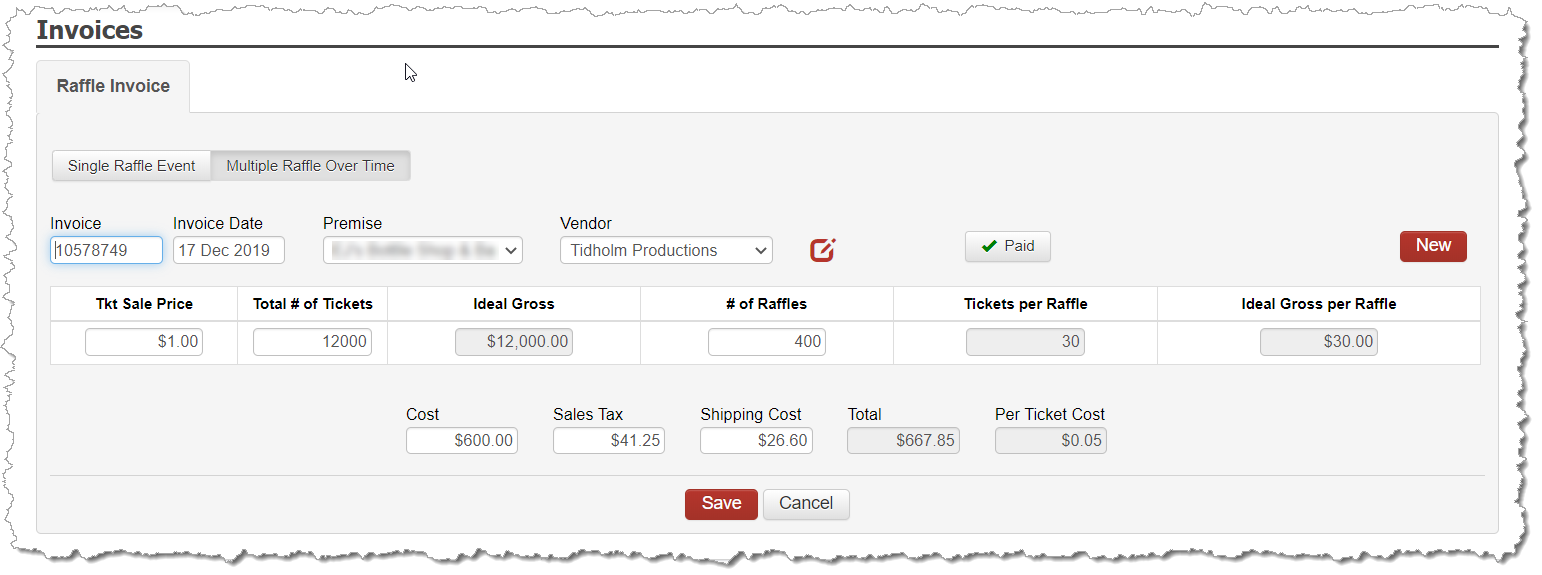
Under INVENTORY -> GAMING INVENTORY, select the button for ENTER INVENTORY.
Enter the following fields:
Invoice Number
Invoice Date
Premise
Vendor who you are purchasing the raffle tickets from.
You may ADD a new vendor on the fly, if needed.
Switch the selection to Multiple Raffles Over Time
Ticket Sale Price – amount you are selling the tickets for.
Number of Tickets – Quantity of Tickets you had printed
For example, if you have 30 tickets you plan to offer with each raffle and you are having 100 raffle books made and selling them for $1 a ticket, then you would have:
Ticket Sale Price = $1
Number of Tickets = 12,000
Number of Raffles = 400
Ideal Gross will auto-populate with $12,000. Tickets per Raffle will auto-populate with 30 based on the values entered.
Cost and Tax values at the bottom
Saving this Invoice will now crate a Payable on your EXPENSES. To correctly document your expense for this invoice, follow the same procedure for documenting expenses to a distributor for gambling product using the BANKING -> EXPENSES -> GAMING PRODUCT process.
TIP: The Invoice Number entered will also be used as the Serial Number for the raffle. Invoice Numbers must be unique and can never be reused. Therefore, including a date in the Invoice Number field can help you quickly identify your raffle. Example: 20170520 for May 20, 2017.