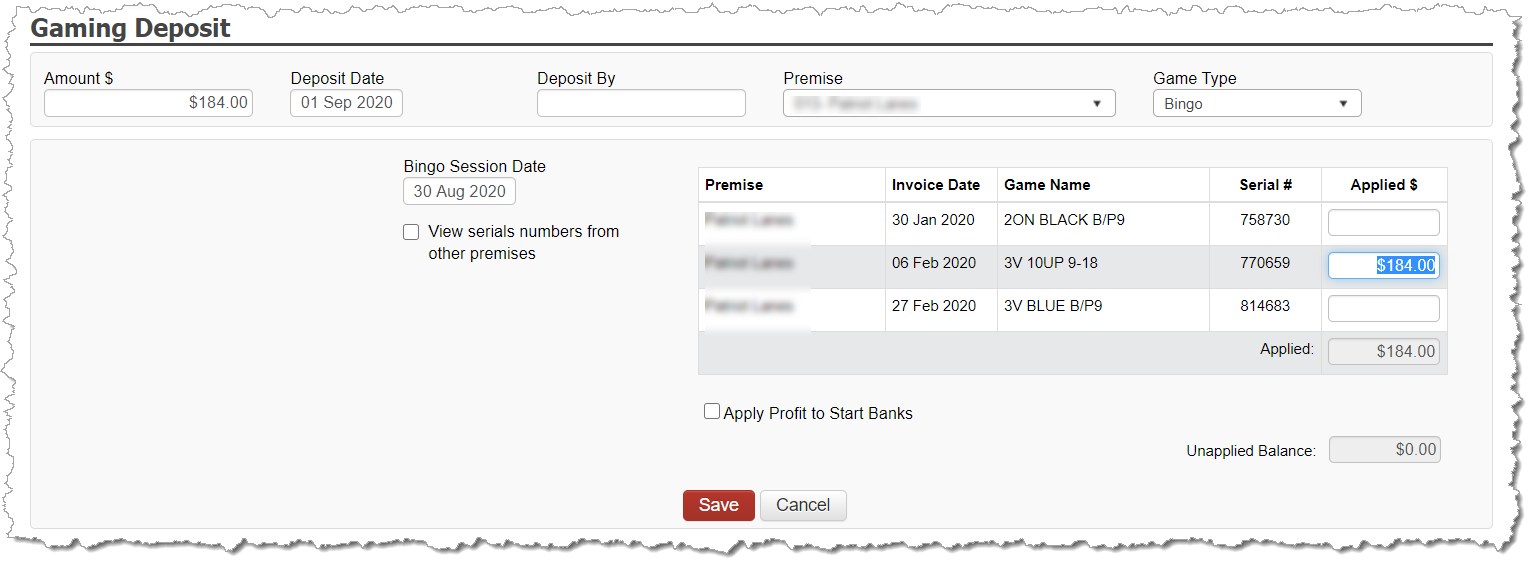
Sessions are documented in 2 ways:
Entry of the cash-on-hand bingo deposit from the session
Entry of the negative net receipts from a session that closed under the start bank
Depositing Bingo Cash-on-Hand
When entering a deposit for a bingo session, you may apply the deposit against any serial number played in the session. The deposit does not need to be split between serial numbers played. Instead, the total session deposit can simply be applied against any serial number from the session.
Entering a deposit into the application for a bingo session results in the following:
The Bank Register is updated with the deposit transaction.
A Bingo Session is created in association to the deposit. The cash-on-hand value of the bingo serial number associated to the session is auto-updated with the deposit amount.
To enter a bingo deposit, select BANKING and choose GAMING DEPOSIT.
Complete the header information:
Amount
Deposit Date
Deposited By (optional – used just for internal tracking)
Premise
Game Type = Bingo
Enter the session's deposit value against any one of the bingo serial numbers played in your session.