Negative Net Receipt Bingo Session
When a bingo session closes under bank, you must still document the session. Instead of entering a Gaming Deposit, since there was no actual deposit to make, follow these steps to document your negative receipt session:
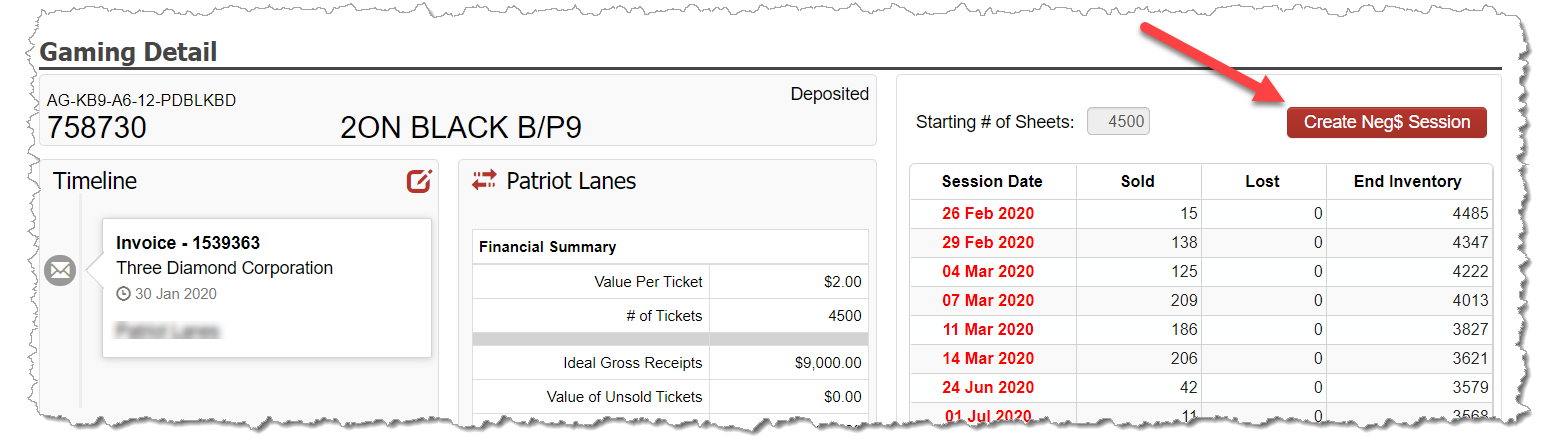
Go to the Gaming Detail screen of any serial number played in the session. You can do this by either entering the serial number in the Search Serial field at the top of the screen, or by going to Inventory – Gaming Inventory and search for and clicking into the desired serial number.
Click on the Create Neg$ Session button.
On the pop-up, enter the date of the session and the amount of the negative net receipts from the session that you will be reimbursing.
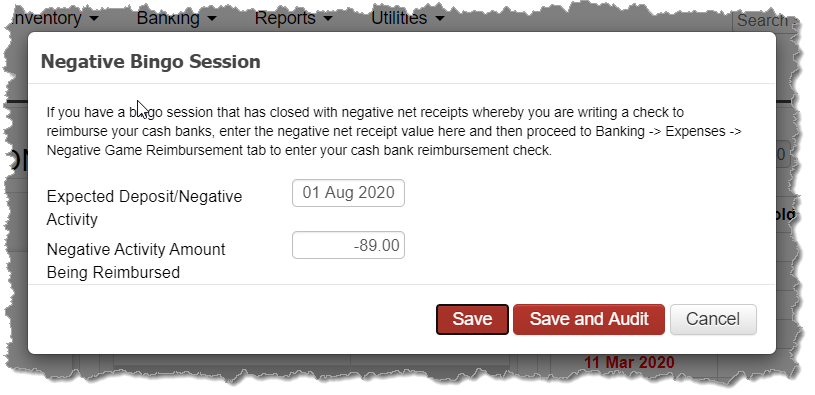
Either Save the entry if you are going to audit the session in the future or if you plan to audit the session immediately, select Save and Audit.
Reimburse the Start Bank
The negative net receipt amount from the session now appears under Banking – Expenses – Negative Game Reimbursement. Use this screen when you document the cash bank reimbursement check you write to bring your start bank back to the full amount