If you have eGaming activity, the information associated to your games is automatically downloaded into CG Made Easy each day. Through this process, the system automatically builds the values which are used to report your eGaming activity on the tax return.
There is technically no action required by you on this screen other than to verify your agreement with the values from your eGaming provided that have been imported into CG Made Easy on your behalf, as well as review the eGaming Gaming Deposits entered to validate the accuracy of your Cash Long/Short.
Verifying Gross Receipts, Prizes, and Net Receipts (both ePulltabs and eBingo)
The eGaming Reconciliation screen presents the sum of all amounts from the month that were imported into CG Made Easy for you to verify. We recommend you review the total values of your Gross receipts, Prizes, and Net Receipts for both ePulltabs and eBingo and compare them to the reports available from your eGaming Manufacturer to ensure they match. Should you find they do not match, but sure to contact CG Made Easy Support before completing your reconciliation.
Verify Cash Long/Short
The eGaming Reconciliation also presents the deposits entered in association to eGaming activity in the month and compares that to the expected deposits based on the activity. This automatically generates the cash long/short value in association to eGaming.
You must review the sum value of your deposits compared to the expected deposit to ensure you agree with the cash long/short value presented before completing your eGaming reconciliation.
Verify Prize Liability
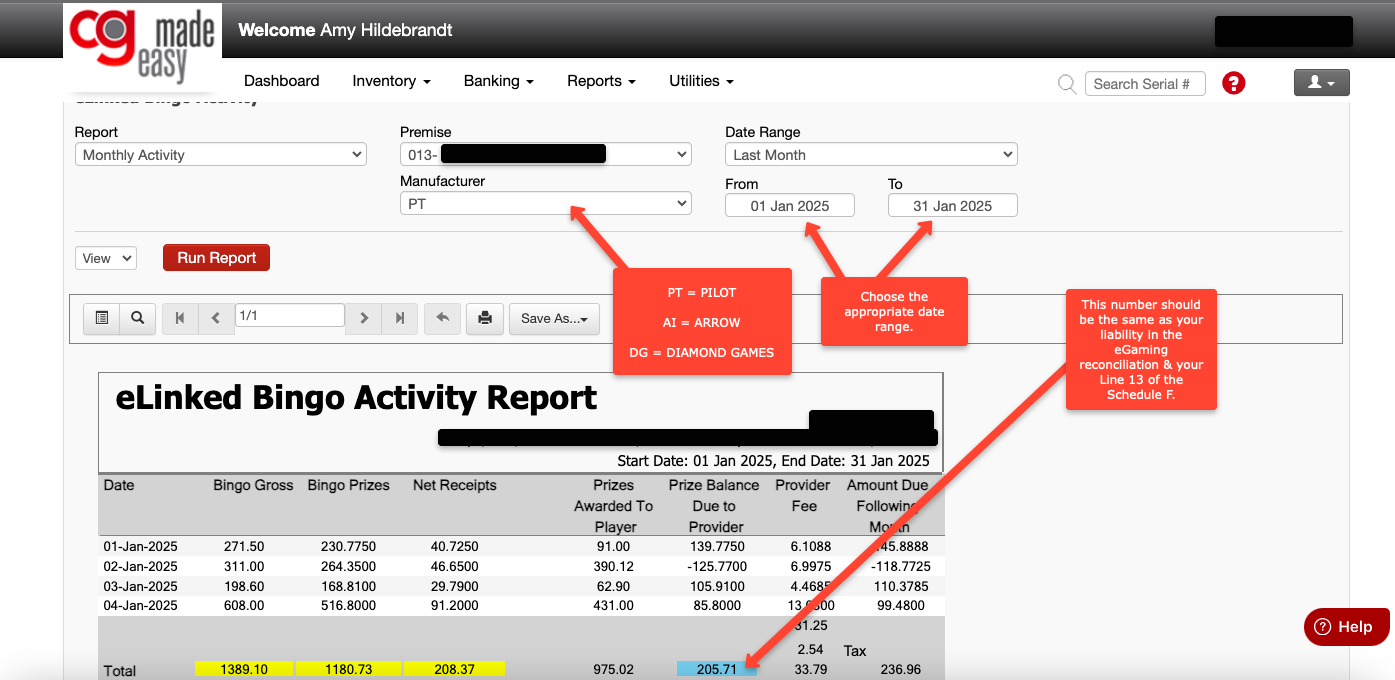
The eGaming Reconciliation also presents the month end prize liability. This amount will be on your Line 13 of the schedule F at month end. This number should match the invoice from your eGaming provider that your receive & pay in the following month. In other words, this IS your outstanding liability that you will pay in the following month.
In addition to comparing that amount to your invoice, you can also check what your liability should be, by going to REPORTS - EGAMING ACTIVITY - choose the LINKED BINGO ACTIVITY circle and make sure you have the correct date range. Pilot & Arrow will be the full month in the date range box, Diamond Games will be the 2nd invoice (16th - 31st). Then RUN REPORT. The blue box will tell you what your prize liability amount SHOULD BE:
Save eGaming Reconciliation
Once you are satisfied with the values presented, you may complete the reconciliation by clicking the box in the top right corner of the screen and selecting SAVE. The saved numbers will be used on the tax return and your dashboard will be presented with a green checkbox for the eGaming reconciliation.