If a game is identified as being defective prior to it being put in play, then simple return the game to the distributor from whom you have purchased it and receive a credit memo for the game from your distributor. In this case, nothing further needs to be reported.
If the game is already in play when it is identified as defective, then the game must be closed/removed from play immediately. This may result in the game being under bank or over bank.
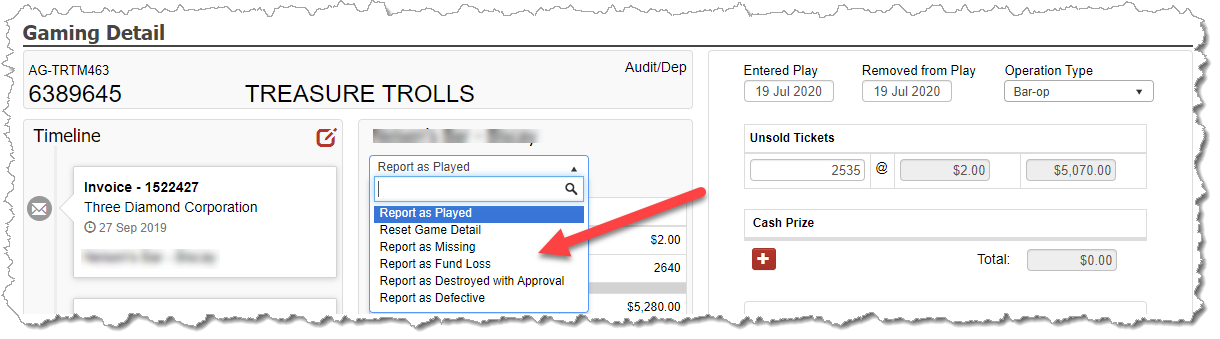
If the game is over bank, enter the deposit and audit the game just like a normal. However, once you are finished and the game’s status is Audit/Dep, select the Report as Defective option from the dropdown so the game is included on a different B2 than the report of the reported games.
If the game us under bank, audit the game like normal and select the option for “Game Closed Under Bank – No Deposit and enter the negative net receipt value at the time the game was closed. However, once you are finished and the game’s status is Audit/Dep, select the Report as Defectiveoption from the dropdown so the game is included on a different B2 than the report of the reported games.
Write a check to reimburse your start bank.
NOTE: In the unfortunate event that you identify a game to be defective when the game is under bank, the game’s manufacturer (or your distributor) will typically provide your organization a check for the value you reported to be under bank. To account for this deposit, there are 2 options:
Enter it under the category of Interest and Other Income. While this is acceptable per the GCB, it will result in paying the tax that is assessed on that category.
Contact your GCB Compliance Officer and explain the situation to them. Let them know that per the rules, these funds are to be deposited into the gambling account, but there is no non-taxable category for it to be associated to. Request an approved adjustment to your profit carryover for the amount in question. If approved, then enter the deposit into CG Made Easy under OTHER DEPOSIT and code the category of the transaction to Approved Adjustment.